
Changelog
Stay up to date with the latest improvements, fixes, and updates for CLI Manager.
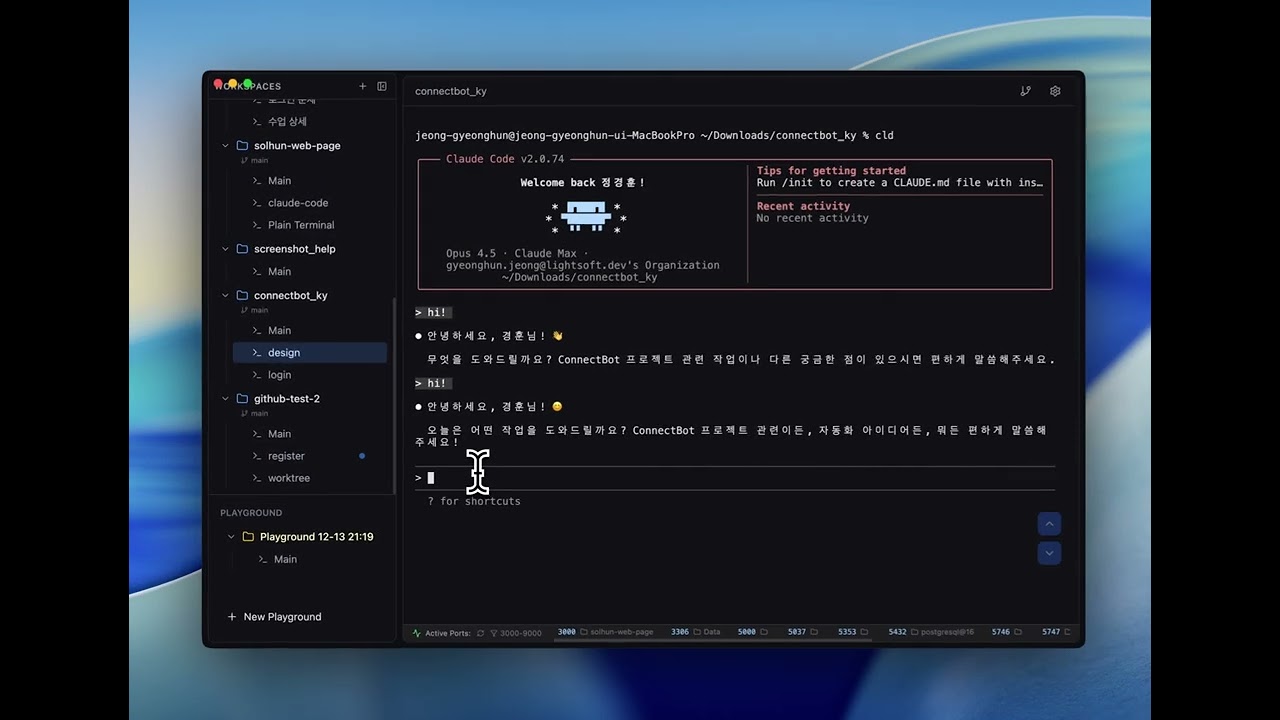
Claude Code Session Monitoring
Real-time session status monitoring inspired by claude-squad. Track Claude Code sessions with visual indicators in the sidebar.
Loop Dashboard
A dedicated window to monitor and manage Claude Code /loop sessions per project — track iteration counts, status, and timing at a glance, without the extra cost of claude -p.
- New Loop Dashboard window — promote any workspace and watch its /loop run in a separate window
- Per-loop stats modal: iteration timeline, average interval, uptime, and last output preview
- Real-time iteration count, last-loop time, and running/ready/stopped status indicators
- Manual restart with --resume to continue a stopped loop
- Configurable loop-count detection (count mode, debounce, stopped-after threshold)
Scrollback Protection
Major terminal pipeline fixes for CLI tools like Claude Code and Codex. Conversation history is no longer destroyed by screen repaints, and running many terminals no longer pollutes your scrollback.
- Upgraded to xterm 6.0 — screen clears now preserve content in scrollback instead of destroying it
- Hidden terminals defer resize until visible, eliminating repaint storms across sessions
- Terminal output batching for smoother rendering with many sessions
- New automated regression test suite for the terminal pipeline
Memo Shortcut
Quick memo toggle with Cmd+J. Open memo, jot notes, close and focus returns to terminal instantly.
- Session memo keyboard shortcut (Cmd+J)
- Auto-focus textarea on open, cursor at end
- Focus returns to terminal on close
Session Memo
Quick notepad for each terminal session. Jot down notes, commands, or reminders right next to your terminal.
- Added per-session memo notepad with auto-save
- Memo indicator shows on toggle button when notes exist
- Cursor position preserved at end of text when reopening
Sidebar Pin & Folder Grouping
Organize your workspaces with pin-to-top and folder grouping. Pin frequently used workspaces to the top of the sidebar, and group related projects into collapsible folders for a cleaner workspace.
- Pin workspaces to top of sidebar via right-click context menu
- Create folders to group related workspaces together
- Collapse/expand folders to hide unused projects
- Move workspaces between folders via context menu
- Rename and delete folders with right-click
Git Worktree Auto-Sync
Automatically detect and sync git worktrees on app startup. Worktrees created or removed externally are now seamlessly reflected in the workspace list.
- Auto-sync worktree workspaces on app startup via git worktree list
- Reload Worktrees button added to workspace and worktree context menus
- Improved workspace state refresh with refreshWorkspacesFromStore utility
System Monitor
Built-in system resource monitoring with on-demand data fetching
- System Monitor: View CPU, RAM, Disk, Battery, active sessions, and uptime in one click
- On-demand data fetching — no background polling, zero resource overhead
- Color-coded progress bars (blue/yellow/red) for resource usage levels
Session Rename, Git Panel Context Menu & UX Improvements
Quick session renaming, Git panel file actions, and drag-and-drop stability improvements
- Session rename shortcut (⌘R on macOS, Ctrl+R on Windows) with auto terminal focus after rename
- Click port numbers in StatusBar to open localhost URL in browser
- Show session count badge next to workspace names (toggle in Settings > Appearance)
- Git Panel file context menu: right-click files for Open in Editor and Copy Path
Claude Session Restore & Keyboard Shortcuts
Added Claude CLI session restore and customizable keyboard shortcuts
- Claude session auto-restore: Automatically adds --session-id when running claude command
- Resume previous Claude session with --resume on app restart
- Session file validation from ~/.claude/projects/
- Keyboard shortcuts: Cmd+]/[ for tab navigation, Cmd+Shift+]/[ for workspace navigation
- Customizable keyboard shortcuts in Settings
Terminal Management & Template Shortcuts
Improved terminal session management and template shortcut features
- New terminal created with Cmd+T is now auto-selected
- Drag to reorder templates in Settings
- Shortcut numbers displayed next to templates (⌘T+1, ⌘T+2, etc.)
Bug Fix
Terminal scroll fix
Terminal PATH Fix
Fixed command not found errors when launching from Finder/Spotlight
Split View & Grid View
New terminal view modes for enhanced productivity
- Split View: Display multiple terminals in a single window with drag & drop support
- Split View: Horizontal/vertical split and grid layouts, up to 4 terminals side by side
- Grid View: Open terminals in a separate window, monitor up to 4 terminals simultaneously
- Grid View: Perfect for multi-monitor setups
Terminal Font Fix & Settings
Bug fix for terminal font settings and default configuration updates
- Enable Claude Code Hooks by default
File Search & Preview
Major update with file search, preview features, and terminal improvements
- Add file search feature (Cmd+Shift+F for filename/content search)
- Add file preview with syntax highlighting (Cmd+Enter)
- Add image file preview support
- Add sidebar terminal preview on hover
- Add terminal context menu for dragging text to Finder or Editor
Improvements and Bug Fixes
Enhanced external link handling and various bug fixes
- Enhanced openExternal IPC handler
- Open in Finder support
Add Cmd+Click support to open file paths from terminal in configured editor
Terminal Link & Drag-Drop Enhancement
- Add Cmd+Click support to open file paths from terminal in configured editor
- Add clickable URL links in terminal (localhost, https, etc.)
Fix Terminal Freezing Issues
Fix Terminal Freezing Issues
Claude Code Session Monitoring
Real-time session status monitoring inspired by claude-squad. Track Claude Code sessions with visual indicators in the sidebar.
- Add Claude Code session monitoring with Running/Ready status indicators
Add quit confirmation dialog with background mode option
Add quit confirmation dialog with background mode option
- Custom editor command support in Settings
- Add quit confirmation dialog with background mode option